
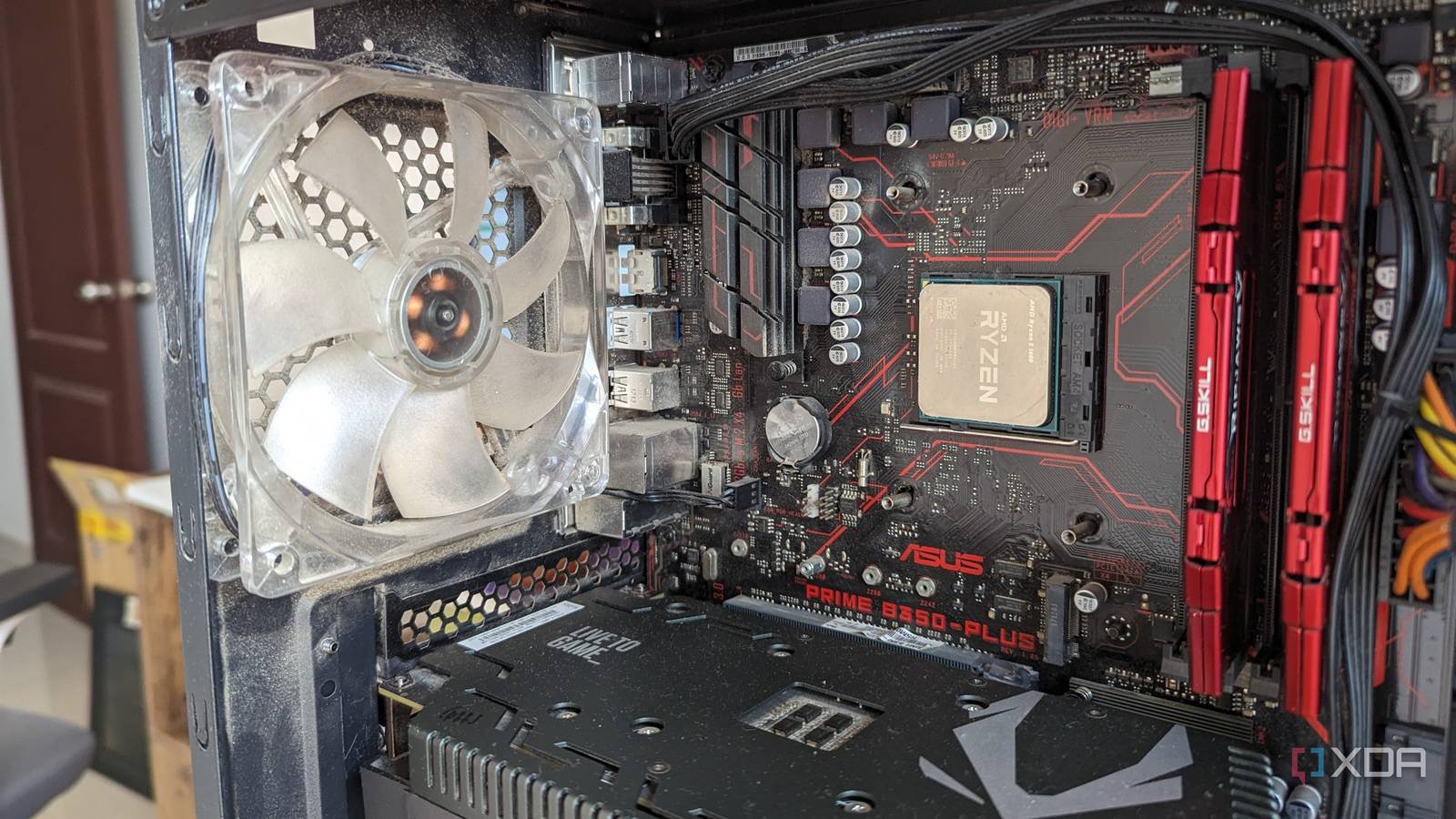
The motherboard is the foundation of any PC, but people are often tempted to buy a lower quality motherboard. After all, if it doesn’t “affect FPS” directly, it should be okay to skimp on it, right? That’s what I thought when choosing the motherboard for my previous build in 2017. I was building a budget build with Ryzen 5 1600 and GTX 1050 Ti (don’t ask), and I thought all I needed was a cheap ATX motherboard with four RAM slots, decent I/O, and proper expansion slots. Little did I know that this oversight would come back to haunt almost every future update I could think of. there are many Features to look for when buying a motherboardwithout which you will inevitably be blocked from one update or another in the future. I learned this the hard way, but you don’t need to make the same mistake.
Single M.2 slot eliminated NVMe upgrades
I was stuck with a single NVMe SSD for years
When I was building this PC, I had no plans to buy an SSD, much less an NVMe drive. I was happy with a 1TB hard drive and decided to delay the jump to flash storage for the near future. However, after a year I bought a 250GB SATA SSD because I couldn’t wait any longer. The drive was small, barely enough for Windows and some games, but the impact on system performance was incredible. Shortly after, the price of NVMe SSDs started to drop and I finally bought a 1TB WD Blue SN550. relegating my hard drive to secondary storage. The problem, which I realized a few years later, was that my motherboard, the Asus Prime B350-Plus, had a single M.2 slot, which was being used by my NVMe drive. I was starting to run out of storage, but adding another NVMe SSD was not an option.
I couldn’t go back to SATA HDDs or SSDs, so the only thing left was to replace the SN550 with a larger NVMe drive. Needless to say, this was not something I was interested in. I had spent quite a bit on the SN550 and couldn’t throw it away so easily. Additionally, a larger 2TB drive would have cost me a lot more at the time, making the situation less than ideal. If you had just one extra M.2 slot on the motherboard, there would be added a second 1TB NVMe SSD and forgot about storage upgrades for the next 3-4 years. I actually decided to stick with my SSD + HDD setup until I get a new PC in 2022.
The importance of Keep the future in mind when purchasing PC components It is often derided as useless for the future, but it is quite necessary in the case of parts like the power supply, CPU cooler, and motherboard. Your CPU and graphics card may last for years and you can add more RAM and storage, but it doesn’t replace your motherboard if it turns out to be the wrong choice. You are forced to keep going until you build a new PC and live with the inability to upgrade your system as you would have wanted.
Never underestimate the importance of fan and ARGB headers
Initially, my build only had to deal with the stock cooler and three case fans (2 intake + 1 exhaust), so the CPU fan header and two chassis fan headers seemed sufficient. However, I completely ignored the possibility that he wanted to add more case fans or replace the original air cooler with an AIO liquid cooler. The single RGB (not ARGB) header and three fan headers in total meant I couldn’t even replace my original fans with ARGB fans without purchasing a fan hub. Adding an AIO cooler would be technically possible as it could compensate for the missing CPU_OPT header by connecting the pump to the CPU_FAN and the radiator fans to the CHA_FAN headers respectively. Still, I would have needed a dedicated ARGB fan hub if my AIO had ARGB lighting.
While it was possible to do these upgrades with dedicated fan hubs, even a cheap motherboard should have had more than two systems. fan headers and a single RGB header. My motherboard choice was clearly due to my limited budget; Otherwise I would have chosen a better model. Nowadays, it is common to see 3 to 4 system fan headers and 2 to 3 ARGB headers on most motherboards, enough to power an AIO cooler with ARGB lighting and even up to 10 case fans (via daisy chaining).

- memory slots
-
4
- Memory type
-
DDR5
- Form factor
-
ATX
- wifi
-
Wi-Fi 7
- Plug
-
AM5
Cheap VRMs killed my high-end CPU dreams
Powerful chips need decent VRMs
A motherboard with a single M.2 slot and very few fan headers was not going to work Quality VRMbut I didn’t focus on that when I built my PC. The B350 board was compatible with my Ryzen 5 1600 and AMD had promised support for future CPUs, so I was satisfied. However, swapping out my 65W chip for something much more powerful in the future was more than just a matter of socket compatibility. The VRMs on my motherboard were a 4+2 phase design, which was enough for my 6-core chip and maybe a slightly more powerful 8-core model. Upgrade to, say, the Ryzen 7 5700X or Ryzen 7 5800X3D a few years later would have become a challenge as the basic VRMs would have prevented me from extracting maximum performance from those chips.
None of the B350 motherboards were known for their excellent VRMs. Asus’ “Prime” series was always intended for entry-level builds, not systems where future CPU upgrades were a priority. So my Asus Prime B350-Plus forced me to stick with the Ryzen 5 1600 for about five years, after which I jumped to a completely new PC. This time, I made sure to choose a much better motherboard: the Gigabyte B550 Aorus Elite AX V2 – it had a high-quality 12+2 phase VRM design and could easily handle high-end Ryzen 5000 processors.
Don’t skimp too much on the motherboard
Most people never need to splurge on a fancy motherboard, but you shouldn’t go to the other extreme either. Buying a cheap motherboard is fine as long as you get the basics right. This includes quality VRM, adequate expansion slots, and a decent number of ports and I/O headers, among other things. Skipping the big M.2 heatsinks, RGB lighting, and other cool features is one thing; hindering future updates due to missing crucial features is another matter entirely.



