
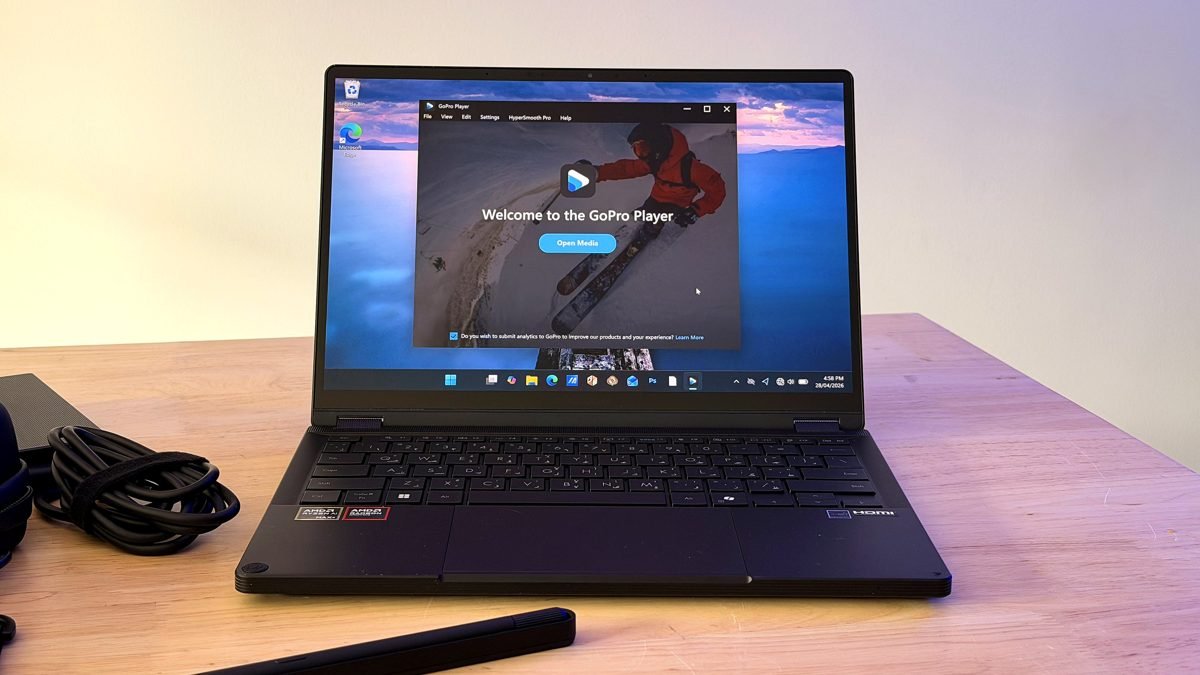
There has always been a gap in the action creator workflow. You go out, shoot amazing footage, come home, and then your laptop reminds you that it wasn’t really designed for any of this. Transcoding takes forever, your files are scattered across cloud drives and apps, and the screen you’re color grading on is technically good, but not exactly reliable.
He ASUS ProArt GoPro Edition (PX13) is a direct attempt to close that gap, not just through branding, but through hardware and software that were clearly designed with this specific type of creator in mind.
Design and durability: it looks like it means business
The first thing that stands out about ProArt Go Pro Editing is that it looks perfect. The chassis has a bold black metal design with CNC-engraved patterns on both the lid and the area above the keyboard. The keyboard backlight and DialPad indicator glow a blue that matches GoPro’s signature cyan—a small touch, but one that makes the collaboration look deliberate.

ASUS has treated the surface with an enhanced Nano Black coating with silane resin and fluorine-modified groups, making it hydrophobic and stain-resistant. For a laptop that’s going to travel, that matters more than it seems.
The ProArt GoPro Edition ships with a hard case inspired by the GoPro packaging design. It’s rigid enough to protect against drops and bumps, features the same CNC-milled patterns as the laptop, and includes a multi-use strap that can hold a GoPro camera along with accessories.

Durability is backed by MIL-STD-810H military grade certification. Testing covers a wide range of conditions: drops, vibrations from 5 to 500 Hz, operation at altitudes up to 15,000 feet, temperatures from -32°C to 71°C, solar radiation, sand and dust, and humidity up to 95% relative humidity for ten days. It sounds less like a laptop and more like a superhero. So whether you subject your laptop to any of those conditions regularly or not, it’s comforting to know that it’s been tested in all of them.

Connectivity is equally well thought out for a machine designed to go anywhere. There are two USB4 Type-C ports running at 40Gbps with 100W PD and up to 8K 120Hz video output, a full-size HDMI 2.1 port that handles up to 4K 120Hz without DSC, a USB 3.2 Gen Type-A port, a 3.5mm audio jack, and, particularly relevant for GoPro users, a microSD UHS-II card reader for fast, direct transfers from the device. camera. WiFi 7 is integrated with support for 320 Mhz channels and 4K QAM modulation, bringing theoretical speeds to around 5.8 Gbps, about 2.4 times faster than WiFi 6/6E. ASUS SmartConnect handles automatic band selection and memorizes mobile access points, which is useful when you work from multiple locations.

The audio completes the image. The dual Dolby Atmos-certified speakers are backed by a Smart Amplifier DSP chip and ASUS Audio Booster software, delivering up to 5.25x combined volume boost without distortion. For monitoring audio tracks or reviewing images, it’s a noticeably better setup than most laptops in this class offer. The machine itself weighs 1.39kg and measures 298 x 209 x 15.8-17.7m – truly portable for everything it contains.
Screen: color that impressed
The 13.3″ OLED panel runs at 3K (2880×1880) resolution in a 16:10 aspect ratio, with a 0.2 ms response time and VESA DisplayHDR True Black 500 certification, meaning it supports up to 500 nits of peak brightness and just 0.0005 nits of black. The contrast ratio is 1,000,000:1.

For creative work, the most important numbers are the color specifications: 100% DCI-P3 coverage, a Delta E less than 1, and PANTONE Validation. What you see on the screen is an accurate representation of what your footage actually looks like, which is the basic requirement for any serious editing job. The panel is protected by Corning Gorilla Glass NBT, which offers 6x better scratch resistance than standard soda-lime glass and a 92% light transmission rate that keeps colors bright and accurate.

ASUS OLED Care is included as standard and offers burn-in protection through a screen protector that activates automatically after 30 minutes of idle use, and the company backs the display with a free screen exchange for any burn-in issues under warranty. Blue light emission is 70% lower than comparable LCD panels and the screen is TÜV Rhineland certified for eye safety.
Performance: no waiting
Under the hood, the ProArt GoPro Edition is powered by AMD Ryzen AI Max+395, a processor that is gaining a reputation as one of the most capable chips available in a thin and light laptop. It features 16 Zen 5 cores, integrated AMD Radeon 8060S graphics with 40 RDNA 3.5 GPU cores, and up to 128GB of unified LPDDR5X memory shared between the CPU, GPU, and NPU.
The last point deserves some attention. Unified memory means the GPU can leverage the entire memory pool for creative workloads, something that traditionally required a discrete GPU with its own dedicated VRAM. In practice, tasks like working with high-resolution video timelines or running large AI models don’t hit the same walls as they would on conventional laptop hardware. AMD is also positioning the Ryzen AI Max+ 395 as the world’s fastest x86 AI consumer PC for running Llama 70B, surpassing even the NVIDIA GeForce RTX 4090 desktop GPU by delivering 2.2x more tokens per second, giving an idea of how much headroom this chip has for AI-accelerated creative workloads.

The reference figures confirm this. Compared to the ProArt PX13 2024 with RTX 4070, the GoPro Edition scores 10,986 vs. 10,487 in 3DMark Time Spy. On Blender’s CPU rendering benchmarks (Monster, Junkshop, Classroom), it records scores of 223.4, 150.5, and 119.9 respectively, up from 142.4, 99.2, and 79.8 on the older machine. DaVinci Resolve 8K video encoding completes in 7 minutes and 10 seconds compared to 8 minutes and 51 seconds, and Photoshop batch processing completes in 2 minutes and 23 seconds compared to 3 minutes and 6 seconds.
These aren’t marginal gains: for any creator who spends a lot of time in Resolve or Premiere on a regular basis, the accumulated time savings add up quickly.
The GoPro ecosystem: where everything comes together
The hardware is the foundation, but the GoPro integration is the reason this laptop exists. And it must be recognized that ASUS goes far beyond co-branding. The centerpiece is ASUS StoryCube, a media management app configured specifically to work with GoPro Cloud, and it addresses the part of the action center workflow that has historically been the most tedious.

The foundation is seamless access to the media. All your GoPro photos and videos, including large 5.6K and 360-degree video files, are automatically added to GoPro Cloud at 100% quality and are fully accessible through StoryCube. There’s no manual syncing or folder searching – the moment the footage hits the cloud, it’s ready to work with on the laptop.
From there, StoryCube’s AI Album feature takes over the organization. Instead of lumping everything into a single chronological pile, it uses AI scene detection to automatically categorize footage based on activity type – the type of content GoPro creators actually record. Facial recognition is also built in, so images are classified based on the people featured and the activity. You can browse your entire library by device, location, or timeline, and search for specific clips without needing to remember exact file names or dates.

Map View organizes footage geographically, which is particularly useful when you’ve filmed in multiple locations. Timeline View organizes everything chronologically. Both make browsing a large library considerably faster than searching through folders. StoryCube also handles the entire import and export side: pulling assets from local storage, connected devices, and cloud services simultaneously. As for editing, it includes tools for trimming videos and layouts, and can automatically generate highlight reels and collections of memories using AI. It’s not intended to replace a full editing suite, but for quick cuts and sharing clips, it gets the job done without needing to open another app.
The ASUS DialPad brings a lot of this together on the hardware side. It’s a physical dial built into the keyboard that integrates directly with Adobe Photoshop, Premiere Pro, Lightroom Classic, Illustrator, After Effects, and CapCut. Pressing the DialPad in any of these apps brings up a context menu of commonly used controls (zoom, brightness, contrast, brush size, undo) adjustable with a physical twist instead of keyboard shortcuts or menu navigation. It’s fully customizable through the ProArt Creator Hub, supports Microsoft Wheel device operation, and has five levels of scroll sensitivity. For anyone who spends a lot of time on Adobe software, it ends up being one of those things that gets lost when it’s not there.

So is it worth it?
He GoPro ProArt Edition (PX13) It is a focused machine. It’s not intended to be all things to all creators – it’s designed specifically for those who shoot with GoPro and need a capable, portable workstation for editing. The hardware holds its own: the Ryzen AI Max+ 395 delivers solid performance, while the OLED display adds visual quality and durability.
More importantly, the GoPro integration and bundled subscriptions feel useful rather than comprehensive: They streamline a workflow that has often been more fragmented than it should be.
ProArt GoPro Edition also includes a value-added subscription package:
-
Dropbox 500GB (6 months) – Easily share and sync large video files
-
ASUS Secure Auto-Backup 200 GB (1 year): automatic backup for important projects
-
GoPro Premium+ (3 months): Cloud backup and advanced editing tools
-
Adobe Creative Cloud (3 months): Access to industry-standard creative software
-
Goodnotes Bundle – 3 months free + 30% off first year, enabling AI-powered note taking and seamless creativity
Together, these additions add practical value, especially for creators working with high-resolution videos across platforms.
For GoPro creators who have made do with general-purpose hardware, this looks like a more personalized and compelling upgrade.



