

Microsoft has announced major customization updates soon to Start menu in Windows 11, addresses top user feedback and requests to enable control over what appears and what doesn’t appear when you open it.
The new customization options are now available in preview through the Windows 11 Insider Program and I’ve been testing the new changes for the last week. It’s awesome to see so many new options available for users to configure, but it makes me wonder why they weren’t added sooner.
So what’s new in customization? Well, users can now fully configure which Start menu segments actually appear. Until now, the Start menu consisted of three main segments: Pinned, Recommended, and All Apps.

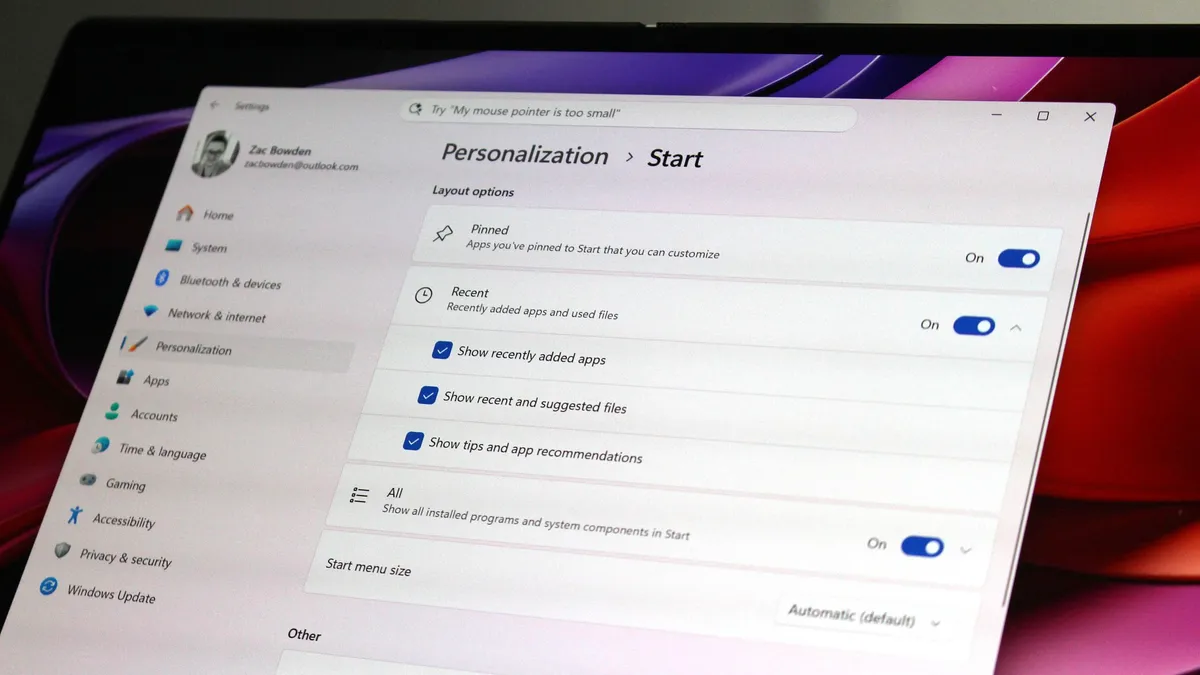
Historically, these segments have been fixed, but users now have the option to disable individual segments if they wish. All Start menu customization options are present in the Windows Settings app, or by right-clicking on an empty space in Start and selecting “Startup Settings.”
Once on the Settings page, you will see three categories that represent the different segments in Home. In addition to being able to disable segments, two of the categories have their own configurable options that users can now customize as well.
For example, for the Recommended feed, you now have the option to choose the type of things that appear there. If you don’t want to see recommended apps, but do want to see recent files and installed apps, you can do so.

Being able to completely disable segments of the Start menu is a super nice addition. I don’t typically find use in the Recommended feed, so being able to turn it off and save space in the Start menu is great. You can also mix and match different configurations depending on your needs.
Unfortunately, you can’t customize the order of the segments. Which means Pinned is always at the top (unless disabled), followed by Recommended and All Apps. If you wanted to pin apps to the bottom, for example, that’s not something you can currently do.
In addition to being able to hide and customize segments, Microsoft is also adding the ability to adjust the size of the Start menu. There are two options to choose from: small and large, and by default Windows is set to choose the size based on your screen size.
Image 1 of 2


However, if you don’t like the automatic option, you can now override it and select which side you want, regardless of screen size. That means I can now configure the little Start menu to appear on my 32-inch monitor, which looks great.
Lastly, Microsoft has added the ability to hide your user account name and profile picture. This is useful for those who are presenting and do not want to share any personal details through the Start menu. It’s a nice addition, but not very important.
These are all great improvements and the level of adjustability is quite surprising. Being able to completely disable the Start menu isn’t something that would be on my bingo card in 2026, but I’m more than happy to see it being an option for those who want that kind of setup.
That said, I think there is more room for improvement. As mentioned above, I think it would be great if we could reposition the different Home sections. Also, I would love to be able to drag to resize the Start menu, since currently the only way to do this is through the dropdown menu in Settings.
I also think it would be great if users were given the option to disable the Start button on the taskbar when all sections of the Start menu are disabled. By extension, maybe Windows should allow the user to remap what the Windows key does when Start is disabled? I wouldn’t mind being able to set it to open the search panel, for example.
Overall, I’m very happy and excited to see Microsoft adding more customization options to Windows 11, even if many users probably don’t want or are interested in customizing the Start menu. As someone who likes to curate this interface, these improvements are welcome in my opinion.

Join us at Reddit at r/WindowsCentral to share your ideas and discuss our latest news, reviews and more.



