
microsoft has introduced a new Feature Indicators page in the windows 11 Internal program. This update allows users to enable or disable announced experimental features directly through Windows Settings, eliminating the need for third-party tools like ViveTool. The feature applies only to officially announced features, while those that remain hidden or untested may still require ViveTool to be enabled.
The Controlled Feature Rollout system, which Microsoft previously used to conduct A/B testing with a limited number of users, has been discontinued for features announced in the Beta channel. Beta experience users now receive these advertised features by default.
How to access and use the New Features Indicators page in Windows 11
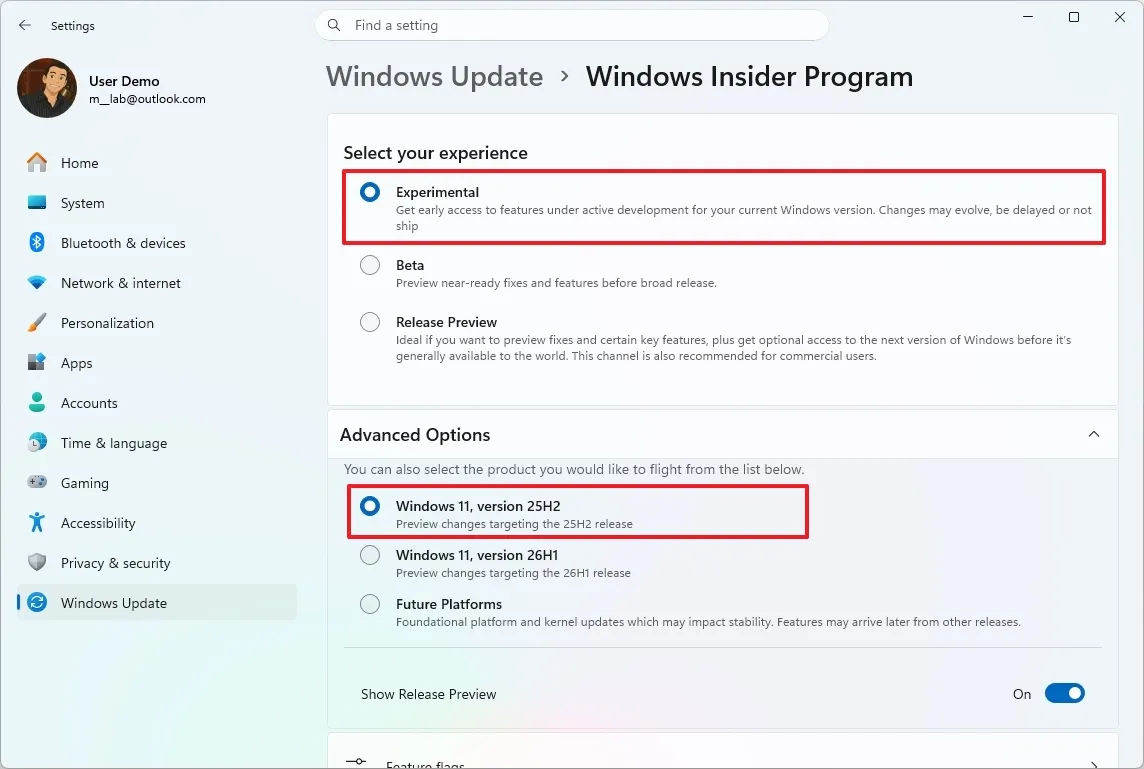
The Feature Flags page can be found in the Experimental Experience section of the Windows Insider Program. To access it, open Settings and then go to Windows Update.
(Source: WindowsCentral)
- Select the Windows Insider Program option.
- Make sure the device is set to the Experimental experience under “Select your experience.”
- Next, open Advanced Options and check the OS version, such as 25H2.
- From there, open the Feature Flags page.
For each experimental feature listed, you have three options: enabling the feature will enable it regardless of CFR status, no override allows Windows to manage its availability, and disabling disables the feature on the device.
After adjusting the options, click Apply changes and then Restart now to apply the new settings.
What Windows 11 feature flags can and can’t control
The feature flags page lists experimental features that Microsoft has officially announced. Multiple functions can be activated at the same time. Features that exist in the build but have not been announced by Microsoft are not listed and require tools like ViveTool to enable them.
This update fixes a long-standing issue where Windows Insiders were able to install pre-release versions but still found that some advertised features were not available due to CFR limitations.
The Feature Flags page is now available for users enrolled in the Windows 11 Insider Program running build 25H2 in the experimental experience. Microsoft has not indicated whether the page will eventually be available for the Beta channel or for stable versions of Windows 11.




